When I first read Elop internal leaked memo, I thought the "plaftorm" that was burning was the whole Nokia as a company. And the way it was going ahead needed to change.
I thought it needed to act faster and be more flexible.
Instead he actually was referring to a platform the way we technical people use it: the Symbian Platform.
I didn't think about that. Symbian is Nokia as much Nokia is Symbian. I never would have thought they, too, would abandon it at one point.
I liked their idea of using Symbian on featurephones and smartphones while adopting a complete Linux stack (Maemo first on the N900 and MeeGo now) on their top-of-the-line devices (those they used to call "mini computers").
It made sense.
So I laughed at those who believed in rumors about Nokia embracing the WP7 platform. Because that, to me, meant dropping Symbian and MeeGo and I never believed it would happen.
Indeed, it didn't. But it's like it did.
They will continue to bring Symbian phones to the market.
They will continue to invest in MeeGo.
Issue is, as Elop said, these next two years are a transition period for Nokia.
What that means, to me, is that they haven't yet decided to took the plunge. They want to see how it goes.
Will Microsoft brand new platform really save Nokia's ass? True it's a compelling new platform with a sparkling shiny new UI paradigm (something even Apple's is missing), but it's still new.
Or will MeeGo really be the shiny true alternative to Android, iOS and WebOS (not to mention the RIM's one based on QNX) ?
Instead of focusing on one, they choose to pursue all of them and see which one will work best.
They sure have the money to do it and, with Microsoft's new platform ready to ship, also the time to do it.
I mean, I can understand that. Symbian was designed for a totally different hardware specs in mind and it shines in that (try to run a complete Linux stack, WebOS, Android or iOS on a featurephone), but it was NEVER designed to scale. It showed that and Nokia needed an alternative.
They tried Maemo.
That meant embracing the Open Source culture. And as we all know, that takes time. We are stubborn, they are as well.
True Maemo was mature enough, and by pushing it more it could have succeeded, but Nokia didn't believe in that. May be that was a misstep.
Maybe they had grander ideas in mind. Maemo as a scalable OS (from smartphones up to Netbooks, passing via the tablets...much like HP's trying to do now [brilliant]).
And that was probably what pushed them to merge Maemo in Moblin to make MeeGo.
But again, doing that properly, with a strong Open Source culture in it, takes a lot of time.
We all have seen it in Linux on the Desktop. We're slow. And that is not good for Nokia.
They needed something yesterday. And we were too slow.
That's why, I think, they went to Microsoft (or, maybe, the other way around, more in a minute).
They'll have a shiny platform (that is really promising, btw) right now (meaning we may see a Nokia WP7 mobile device by the end of the year?) and they can still continue experimenting with the open source community and MeeGo. At one point that platform may be powerful enough to drop WP7 again and embrace it fully.
But they clearly don't believe in that, yet.
There probably wasn't much choice either. WP7 still could allow them to differentiate from other hw vendors (everyone's selling an Android phone, few are selling WP7 phones).
And that maybe what pushed Microsoft to give Nokia more control on the hw than it gave the others.
Microsoft NEEDED a stronger ally after they've lost HP.
HTC seems to be mainly interested in Android and LG is too moody, perhaps.
Nokia's perfect for Microsoft. It's exactly what they needed. And they wanted it badly enough to give Nokia more control.
So, yeah, the big news is that they jumped from the burning (Symbian) "platform". But they didn't really made a big change yet. They are still waiting. Thus the "transition" period.
This is the way I see it.
So, what does this mean to us as MeeGo/Maemo Open Source community.
That's just guessing now. It may turn well if MeeGo proves itself. I mean IT IS a much nicer platform than Android or iOS. Slightly more flexible than webOS. But it needs much more than that to succeed in this world.
After all, Linux on the desktop IS far superior to anything else, but that's not enough and Canonical is understanding that.
The Open Source approach gives you freedom, but it slows you down. Democracy is such a bitch sometimes.
Showing posts with label maemo. Show all posts
Showing posts with label maemo. Show all posts
Friday, February 11, 2011


Thursday, December 09, 2010
Synching your N900 with Google (Mail, Contacts, Calendar) with no third-party tools or service.
Today I was thinking...that it's time I keep my phone in sync with my Google stuff (e-mails, contacts and calendar)
I started by clearing up my Google Cntacts (https://www.google.com/contacts) as they'll be later loaded into the device and because it's much easier to work from a desktop than from the device itself.
If you already have (and most probably that is the case here) contacts on your device, I'd suggest to export them in a file, mail them over to yourself and load them in Google).
Google contacts also helps you spot duplicates, but it's not the perfect tool in the world, so go scan your contact list once more.
As for the Calendar, be warned that only the main Google Calendar will be synchronized over. I cleared that a bit and moved a few events over.
I then went on the N900 and cleared the N900 calendar. You can skip this step as explained later.
To sync Mail on your N900 you have two valid options: use regular Gmail account in the default N900 Mail client (Modest) or use Nokia Messaging. The latter brings push e-mail, but if you don't care, then just set-up a Google Gmail account and you're done.
Also Nokia Messaging brings you a better control on when to synchronize your e-mail (like which days, what hours, if in roaming, minimum battery charge and intervals).
I configured IMAP on Google Gmail and configured which folders (labels in Google terminology) I wanted to sync. Registered with Nokia Messaging and entered my Gmail credentials. On the N900 it's just a matter of selecting Nokia Messaging and enter its credentials.
What's cool it's that Nokia Messaging shows as one single mail account in Modest, but it can be configured (on the Nokia servers) with multiple mailboxes (Nokia's terminology for Mail Account). I do let him handle my ovi.com account as well.
For Google Calendar and Google Contacts I use the Mail for Exchange (MfE) client provided with the N900 itself.
This client is really picky (it's a bug, but that's all we have) so follow the instructions carefully.
First of all it expects a clean calendar and a clean contacts roster.
You don't have to do either now.
Anyway, start MfE and enter you Google credentials. Note that "User name" HAS to be your full e-mail address (actually I didn't without the @gmail.com suffix, but that's what the whole Internet agrees upon). Leave Domain empty.
On the next screen type in:
Server: m.google.com
Leave the other untouched:
Port: 443
Secure connection: Tick
On the next screen UnTick e-mail (we've already covered that and it won't work anyway).
Leave calendar, tasks and contacts ticked.
As "First synchronization" choose "Delete items on device" (I found out it needs it, you may be lucky and try to leave them, but if you exported and loaded them on Google, you won't need them there now anyway).
On the Next screen tap on Advanced and scroll down to "Calendar and tasks".
If you didn't delete the N900 calendar as above, you will need to use a different one.
Tap on "Calendar" and choose "Create new". It will create a new "Mail for Exchange" calendar when synchronizing.
Keep in mind that if you get any errors and need to re-start, you NEED to have a clean calendar (either manually delete it from Calendar or Create a new one).
I never ticked completed tasks, so I am not sure it works.
Click on Save and go to the Next page.
It should synchronize everything with no errors.
When it has completed, tap on Finish and then on Details, sometimes it doesn't sync Contacts, if that is the case, tap on Synchronize Manually, it should sync them this time.
Unfortunately in my case, MfE forgets the configuration when I close it, so I don't know if it works stable over the days.
But before closing it I did try to update contacts and calendars and they were correctly kept in sync everytime I clicked on Synchronize Manually.
So, there you have it, hoe it works for you as well!
PS: later I'll update the post with screenshots and clean it up a bit.
I started by clearing up my Google Cntacts (https://www.google.com/contacts) as they'll be later loaded into the device and because it's much easier to work from a desktop than from the device itself.
If you already have (and most probably that is the case here) contacts on your device, I'd suggest to export them in a file, mail them over to yourself and load them in Google).
Google contacts also helps you spot duplicates, but it's not the perfect tool in the world, so go scan your contact list once more.
As for the Calendar, be warned that only the main Google Calendar will be synchronized over. I cleared that a bit and moved a few events over.
I then went on the N900 and cleared the N900 calendar. You can skip this step as explained later.
To sync Mail on your N900 you have two valid options: use regular Gmail account in the default N900 Mail client (Modest) or use Nokia Messaging. The latter brings push e-mail, but if you don't care, then just set-up a Google Gmail account and you're done.
Also Nokia Messaging brings you a better control on when to synchronize your e-mail (like which days, what hours, if in roaming, minimum battery charge and intervals).
I configured IMAP on Google Gmail and configured which folders (labels in Google terminology) I wanted to sync. Registered with Nokia Messaging and entered my Gmail credentials. On the N900 it's just a matter of selecting Nokia Messaging and enter its credentials.
What's cool it's that Nokia Messaging shows as one single mail account in Modest, but it can be configured (on the Nokia servers) with multiple mailboxes (Nokia's terminology for Mail Account). I do let him handle my ovi.com account as well.
For Google Calendar and Google Contacts I use the Mail for Exchange (MfE) client provided with the N900 itself.
This client is really picky (it's a bug, but that's all we have) so follow the instructions carefully.
First of all it expects a clean calendar and a clean contacts roster.
You don't have to do either now.
Anyway, start MfE and enter you Google credentials. Note that "User name" HAS to be your full e-mail address (actually I didn't without the @gmail.com suffix, but that's what the whole Internet agrees upon). Leave Domain empty.
On the next screen type in:
Server: m.google.com
Leave the other untouched:
Port: 443
Secure connection: Tick
On the next screen UnTick e-mail (we've already covered that and it won't work anyway).
Leave calendar, tasks and contacts ticked.
As "First synchronization" choose "Delete items on device" (I found out it needs it, you may be lucky and try to leave them, but if you exported and loaded them on Google, you won't need them there now anyway).
On the Next screen tap on Advanced and scroll down to "Calendar and tasks".
If you didn't delete the N900 calendar as above, you will need to use a different one.
Tap on "Calendar" and choose "Create new". It will create a new "Mail for Exchange" calendar when synchronizing.
Keep in mind that if you get any errors and need to re-start, you NEED to have a clean calendar (either manually delete it from Calendar or Create a new one).
I never ticked completed tasks, so I am not sure it works.
Click on Save and go to the Next page.
It should synchronize everything with no errors.
When it has completed, tap on Finish and then on Details, sometimes it doesn't sync Contacts, if that is the case, tap on Synchronize Manually, it should sync them this time.
Unfortunately in my case, MfE forgets the configuration when I close it, so I don't know if it works stable over the days.
But before closing it I did try to update contacts and calendars and they were correctly kept in sync everytime I clicked on Synchronize Manually.
So, there you have it, hoe it works for you as well!
PS: later I'll update the post with screenshots and clean it up a bit.
Friday, September 10, 2010
First MeeGo conference is around the corner
So, the first MeeGo conference will be upon us in two months and it's time for me to wrap up what's been going on with me and the transition from Maemo to MeeGo.
First of all, I hoped to have more spare time to dedicate to the completion of the Maemo version of Xournal. The latest version in extras-devel still need some fixing and at least a bunch of features before pushing it to Extras.
I still plan to finish it BEFORE starting some work on MeeGo.
Weird enough, even though I didn't touch it lately, some users are reporting crashes in Xournal. I do experience it myself.
I have, on my N900, the latest dev version (not in Extras, but with not many new changes) and it has always worked fine until few weeks ago I got a message from a user complaining it was crashing for him.
At first I thought it was an isolated case. But then I grabbed my N900 and Xournal was crashing on me as well! As soon as the File Dialog tries to appear, it crashes.
I have no idea, yet, of what is happening. It clearly seems some other app we've both installed changed some shared library. I'll have to try on my girlfriend's N900 and see what's happening. Her version (older, I think she's using the Extras one) seems to work fine and she hasn't installed that much crap anyway.
So, the plan is to complete the Maemo version, push it to Extras and then start working on the MeeGo version.
Hopefully by that time, the MeeGo SDK would be stable enough.
Only big issue is, again, time. I already dealt with a customer go-live deadline in July and moved to East Canada to follow a new customer go-live process since then. I can't speak of any go-live date as this is confidential, but I can tell you that a news we recently got ourselves will mean even less spare time for me and thus Xournal.
But I still think I'll manage to fix this issue, add a few feature to Xournal from the desktop version and push it to Extra before the conference.
Speaking of which, I do wish I could attend and I did apply for sponsorship, but I am not sure it'll get accepted. Flying from Canada is expensive and my contributions to MeeGo sum up to none so far.
However, that won't mean I will stop supporting Xournal and working on it for Maemo and/or MeeGo :)
That, I guess, is good news for Xournal users, right ? :)
Last thing, a user on the Xournal thread on talk.maemo.org is willing to help and I still haven't got time to wrap up a small e-mail highlighting the parts of the code where he should concentrate most... that says how much spare time I've got :/
Anyway...I'll make it work :)
Sooner or later, I'll make it work and have a final stable version of Xournal on Extras with a few new useful features.
Aniello
First of all, I hoped to have more spare time to dedicate to the completion of the Maemo version of Xournal. The latest version in extras-devel still need some fixing and at least a bunch of features before pushing it to Extras.
I still plan to finish it BEFORE starting some work on MeeGo.
Weird enough, even though I didn't touch it lately, some users are reporting crashes in Xournal. I do experience it myself.
I have, on my N900, the latest dev version (not in Extras, but with not many new changes) and it has always worked fine until few weeks ago I got a message from a user complaining it was crashing for him.
At first I thought it was an isolated case. But then I grabbed my N900 and Xournal was crashing on me as well! As soon as the File Dialog tries to appear, it crashes.
I have no idea, yet, of what is happening. It clearly seems some other app we've both installed changed some shared library. I'll have to try on my girlfriend's N900 and see what's happening. Her version (older, I think she's using the Extras one) seems to work fine and she hasn't installed that much crap anyway.
So, the plan is to complete the Maemo version, push it to Extras and then start working on the MeeGo version.
Hopefully by that time, the MeeGo SDK would be stable enough.
Only big issue is, again, time. I already dealt with a customer go-live deadline in July and moved to East Canada to follow a new customer go-live process since then. I can't speak of any go-live date as this is confidential, but I can tell you that a news we recently got ourselves will mean even less spare time for me and thus Xournal.
But I still think I'll manage to fix this issue, add a few feature to Xournal from the desktop version and push it to Extra before the conference.
Speaking of which, I do wish I could attend and I did apply for sponsorship, but I am not sure it'll get accepted. Flying from Canada is expensive and my contributions to MeeGo sum up to none so far.
However, that won't mean I will stop supporting Xournal and working on it for Maemo and/or MeeGo :)
That, I guess, is good news for Xournal users, right ? :)
Last thing, a user on the Xournal thread on talk.maemo.org is willing to help and I still haven't got time to wrap up a small e-mail highlighting the parts of the code where he should concentrate most... that says how much spare time I've got :/
Anyway...I'll make it work :)
Sooner or later, I'll make it work and have a final stable version of Xournal on Extras with a few new useful features.
Aniello
Wednesday, August 11, 2010
MeeGo 1.1 Handset UX (unstable) running on the N900
Today I was thinking...that it'd be nice to share a video of the recently "released" unstable version of the MeeGo 1.1 Handset UX running on the N900.
So, with no further ado, here is the video:
http://www.youtube.com/watch?v=eAtS5EUVAZ4
So, with no further ado, here is the video:
http://www.youtube.com/watch?v=eAtS5EUVAZ4
Wednesday, February 17, 2010
MeeGo is born, what about me?
Today I was thinking...too much.
Too many news in the last few days. Coupled with my imminent relocation to Canada. Coupled with Xournal demanding more and more time.
Anyway.. I gave up thinking. MeeGo didn't Go, it Came and it's going to stay.
Maemo went. And I say goodbye to it. I will miss the brand.
So now, as Maemo developer and as Maemo community member I need to choose.
And I suppose the answer is easy to reach.
MeeGo came and I am going to jump on it.
Why shouldn't I ?
I was going (actually... let's use the proper word: forced; I was forced) to move to Qt anyway.
From my developer point of view nothing will change.
If Maemo 6 was about to arrive, I'd have to learn Qt anyway if I wanted to stay up to date with it.
I hate thinking I need to rewrite to whole Xournal UI because of that.
I had to postpone a few ideas (HRW and better 'background' tools) to when the Qt transaction of Xournal will be completed.
And I don't like that. I wanted to have some fun implementing new features, whilst now I need to re-concentrate, again, on the UI.
Sure I will have the opportunity to learn Qt, I will try to implement the Xournal "Next Gen" UI that Patricia kindly developed for Xournal.
But I planned differently and I am forced to change that.
I hope Nokia won't change idea again. I hope THIS is their commitment. And that they will stick with it.
The Qt UI has to be the latest mobile UI that Xournal will have. Please.
Aniello
Too many news in the last few days. Coupled with my imminent relocation to Canada. Coupled with Xournal demanding more and more time.
Anyway.. I gave up thinking. MeeGo didn't Go, it Came and it's going to stay.
Maemo went. And I say goodbye to it. I will miss the brand.
So now, as Maemo developer and as Maemo community member I need to choose.
And I suppose the answer is easy to reach.
MeeGo came and I am going to jump on it.
Why shouldn't I ?
I was going (actually... let's use the proper word: forced; I was forced) to move to Qt anyway.
From my developer point of view nothing will change.
If Maemo 6 was about to arrive, I'd have to learn Qt anyway if I wanted to stay up to date with it.
I hate thinking I need to rewrite to whole Xournal UI because of that.
I had to postpone a few ideas (HRW and better 'background' tools) to when the Qt transaction of Xournal will be completed.
And I don't like that. I wanted to have some fun implementing new features, whilst now I need to re-concentrate, again, on the UI.
Sure I will have the opportunity to learn Qt, I will try to implement the Xournal "Next Gen" UI that Patricia kindly developed for Xournal.
But I planned differently and I am forced to change that.
I hope Nokia won't change idea again. I hope THIS is their commitment. And that they will stick with it.
The Qt UI has to be the latest mobile UI that Xournal will have. Please.
Aniello
Thursday, December 17, 2009

Friday, November 20, 2009

Tuesday, November 17, 2009


Monday, November 16, 2009

Sunday, November 15, 2009
The mini-computer: N900
Today I was thinking...that wow! the new N900 with the latest available firmware (1.2009.41-11) is simply amazing. My main concern with the N900 is that its battery life used to suck hard when using it as it should be (multitasking, always on-line, always on GPS and stuff like that).
Two days ago I've updated it to the official final firmware and I am happy to say that I am REALLY impressed by its battery life now.
Before upgrading, I used to disconnect my N900 from the charger in the morning, go on-line and come to work. This would take (from waking up to work) up to 2 hours (I know, I love to have a slow start).
I used to disconnect the N900 after the usual morning shower, so that it could keep me company for breakfast.
By the time I arrived to work, the battery sometimes was close to be half drained!
That is, by lunch time, I had to put it on charge otherwise it wouldn't make the bus trip back home.
Today, yeah I know.. it's Sunday, I woke up to go to work. Usual routine.
But on the way to work I changed my mind and decided to walk a bit around Richmond and Kew Gardens and explore the surroundings a bit. It is an amazingly sunny day.
The way I love it. Sunny, a breeze of wind, not cold at all and wet ground.
While waiting for my girlfriend to reach me from Twickenham to Richmond, I walked around Richmond Green and took several pictures.
She arrived and we decided to take the 391 bus to Kew Gardens.
We wanted to try the food of a shop that we always see from the bus (The Maids of Honour). It opens at 12am until 5pm on Sunday and we were there at 11:30am.
Thus we went for a walk around Kew as well (amazing houses and neighbourhood).
While strolling around Kew we noticed several amazing houses for rent and we checked the estate agents websites while walking.
We went back to the Maids of Honour sometime after 1pm.
Enjoyed our brunch/lunch and then took the bus to work while she went back home.
The result of this nice morning is this set of pictures: Twickenham, Richmond and Kew on an autumn sunny day.
And this was the N900 status after all of this:

while the battery is STILL at this level:

Pretty amazing stuff, isn't it?
Now that I think about it.. isn't this the time of the year for oranges?
Aniello
Two days ago I've updated it to the official final firmware and I am happy to say that I am REALLY impressed by its battery life now.
Before upgrading, I used to disconnect my N900 from the charger in the morning, go on-line and come to work. This would take (from waking up to work) up to 2 hours (I know, I love to have a slow start).
I used to disconnect the N900 after the usual morning shower, so that it could keep me company for breakfast.
By the time I arrived to work, the battery sometimes was close to be half drained!
That is, by lunch time, I had to put it on charge otherwise it wouldn't make the bus trip back home.
Today, yeah I know.. it's Sunday, I woke up to go to work. Usual routine.
But on the way to work I changed my mind and decided to walk a bit around Richmond and Kew Gardens and explore the surroundings a bit. It is an amazingly sunny day.
The way I love it. Sunny, a breeze of wind, not cold at all and wet ground.
While waiting for my girlfriend to reach me from Twickenham to Richmond, I walked around Richmond Green and took several pictures.
She arrived and we decided to take the 391 bus to Kew Gardens.
We wanted to try the food of a shop that we always see from the bus (The Maids of Honour). It opens at 12am until 5pm on Sunday and we were there at 11:30am.
Thus we went for a walk around Kew as well (amazing houses and neighbourhood).
While strolling around Kew we noticed several amazing houses for rent and we checked the estate agents websites while walking.
We went back to the Maids of Honour sometime after 1pm.
Enjoyed our brunch/lunch and then took the bus to work while she went back home.
The result of this nice morning is this set of pictures: Twickenham, Richmond and Kew on an autumn sunny day.
And this was the N900 status after all of this:
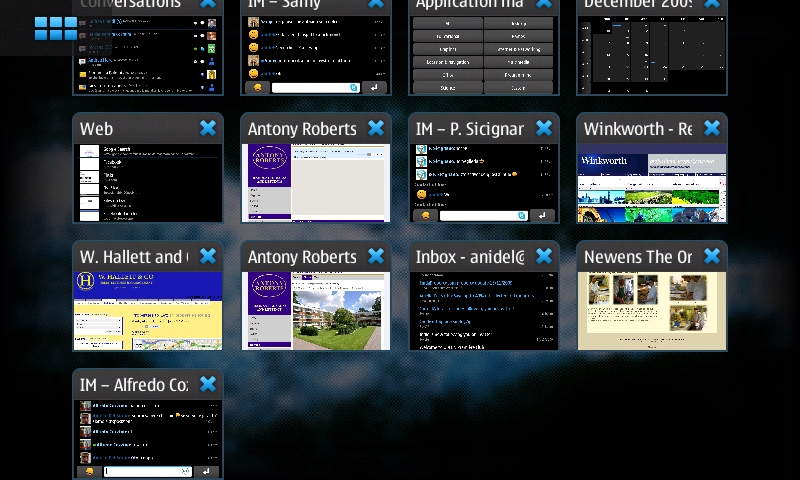
while the battery is STILL at this level:
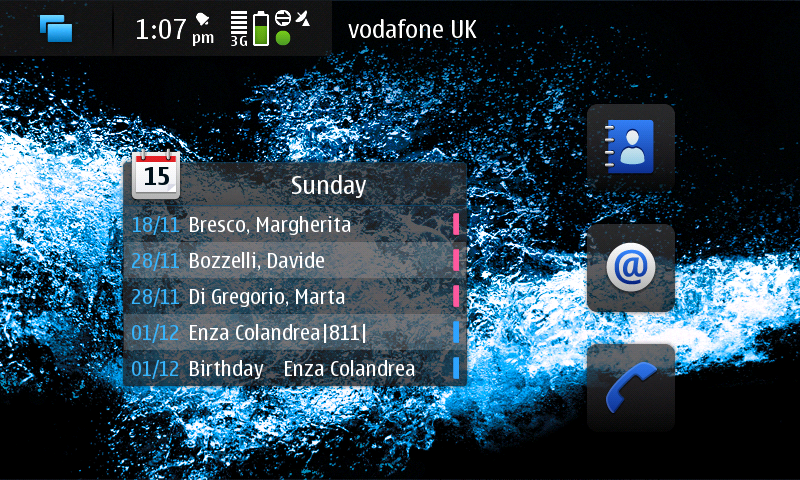
Pretty amazing stuff, isn't it?
Now that I think about it.. isn't this the time of the year for oranges?
Aniello
Monday, November 09, 2009

Saturday, October 31, 2009
Tentative: UX meets Code hackfest in December @ Barcelona
Quim recently started a new thread on Talk.m.o about a tentative meeting for UX experts and Code writers in Barcelona in December (4th to 6th).
Follow the thread and, if you are into Maemo as a UX enthusiast or Code writer, do register your interest in there.
There is some budget for it and Quim is aiming at gathering around 50 people to it.
Please note that nothing is confirmed yet.
Based on the interest this hackfest will generate, it will confirmed or canceled.
I feel it is a very interesting hackfest as I do like to write code, but when it comes to the UX of my application, I face plenty of new issues and doubts.
Surely that is the place I want to go for shedding some light onto them.
Follow the thread and, if you are into Maemo as a UX enthusiast or Code writer, do register your interest in there.
There is some budget for it and Quim is aiming at gathering around 50 people to it.
Please note that nothing is confirmed yet.
Based on the interest this hackfest will generate, it will confirmed or canceled.
I feel it is a very interesting hackfest as I do like to write code, but when it comes to the UX of my application, I face plenty of new issues and doubts.
Surely that is the place I want to go for shedding some light onto them.
Thursday, October 29, 2009
Extras-testing Marathon – Next Saturday (Oct 31)
Let's spread this piece of news:
Quim just sent this e-mail, please participate and test apps!
It'll be fun! :)
Forwarding this email from the maemo community council to Summit Participants with an N900. Please re-forward to anybody you know using the N900.
http://maemo.org/downloads/Maemo5
has currently 22 applications ready for end users.
http://maemo.org/packages/repository/qa/fremantle_extras-testing
contains 74 application waiting for the evaluation of betatesters -people just like you.
Imaging having 50 stable applications from the community by sales start: 75? 100?
You can help. Help pushing at least those apps you are using frequently.
Thank you!
********************
Extras-testing Marathon – Next Saturday (Oct 31)
Are you a lucky N900 owner? Want to help the Maemo Community?
This call is for you.
In the next Saturday (Oct 31) from 14:00 till 19:00 (UTC/GMT) we will host a testing marathon at #maemo-testing@Freenode, in order to make more awesome community applications available for end users.
This marathon will be also a test for our community Q&A process [1], we want to test it and improve it before the N900 hits the shelves.
If you’re a developer, make sure your applications are in good shape before the testing marathon.
More info: http://www.valeriovalerio.org/?p=289
Join the discussion here: http://talk.maemo.org/showthread.php?t=33164
[1] - http://wiki.maemo.org/Extras-testing
Best regards,
-- Valério Valério Maemo Community Council Chair
http://www.valeriovalerio.org
Quim just sent this e-mail, please participate and test apps!
It'll be fun! :)
Forwarding this email from the maemo community council to Summit Participants with an N900. Please re-forward to anybody you know using the N900.
http://maemo.org/downloads/Maemo5
has currently 22 applications ready for end users.
http://maemo.org/packages/repository/qa/fremantle_extras-testing
contains 74 application waiting for the evaluation of betatesters -people just like you.
Imaging having 50 stable applications from the community by sales start: 75? 100?
You can help. Help pushing at least those apps you are using frequently.
Thank you!
********************
Extras-testing Marathon – Next Saturday (Oct 31)
Are you a lucky N900 owner? Want to help the Maemo Community?
This call is for you.
In the next Saturday (Oct 31) from 14:00 till 19:00 (UTC/GMT) we will host a testing marathon at #maemo-testing@Freenode, in order to make more awesome community applications available for end users.
This marathon will be also a test for our community Q&A process [1], we want to test it and improve it before the N900 hits the shelves.
If you’re a developer, make sure your applications are in good shape before the testing marathon.
More info: http://www.valeriovalerio.org/?p=289
Join the discussion here: http://talk.maemo.org/showthread.php?t=33164
[1] - http://wiki.maemo.org/Extras-testing
Best regards,
-- Valério Valério Maemo Community Council Chair
http://www.valeriovalerio.org
Monday, October 26, 2009
N900 as modem for Ubuntu 9.10
Today I was thinking...that's been a while no post.
Thus here I am showing you how to use your Nokia N900 as a broadband modem with Ubuntu 9.10.
It's as easy as connect it via USB and choOse the "PC Suite mode".
A Wizard should appear on Ubuntu with few easy step to configure the modem with your provider (attached are the screenshots to document the process).
If the Wizard does not appear simply go to Edit Connections... and add a new mobile broadband connection.
Enjoy the screenshots!
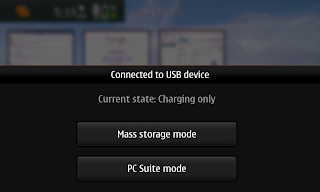
Choose "PC Suite mode"
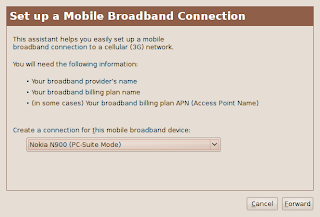
Choose your Nokia N900 as mobile broadband device.
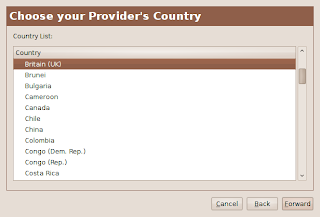
Pick your country.
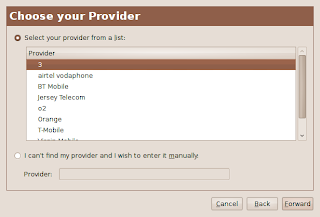
Choose your provider from the list of known ones.
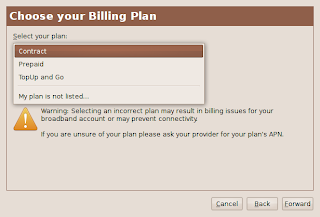
Choose your plan among Contract, Prepaid and TopUp and Go available for the chosen provider.
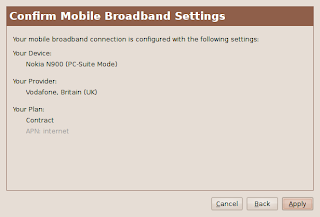
You're done, click apply to save the profile.
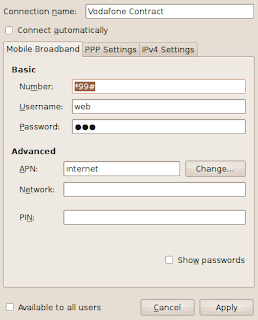
Give it a name and save it.
That's it!
Thus here I am showing you how to use your Nokia N900 as a broadband modem with Ubuntu 9.10.
It's as easy as connect it via USB and choOse the "PC Suite mode".
A Wizard should appear on Ubuntu with few easy step to configure the modem with your provider (attached are the screenshots to document the process).
If the Wizard does not appear simply go to Edit Connections... and add a new mobile broadband connection.
Enjoy the screenshots!

Choose "PC Suite mode"

Choose your Nokia N900 as mobile broadband device.

Pick your country.

Choose your provider from the list of known ones.

Choose your plan among Contract, Prepaid and TopUp and Go available for the chosen provider.

You're done, click apply to save the profile.

Give it a name and save it.
That's it!
Saturday, August 22, 2009
Xournal alpha for Fremantle

Today I was thinking...that well it's better to play for Maemo than working :)
So I went ahead and, after a whole day fighting with bugs and
packaging, I am proud to say that finally Xournal is available for
Fremantle!!
It's only an alpha version (as you can see from the screenshot above) and probably it won't even start on your SDK, but it's the very first step on the right path.
You can find it in Fremantle extras-devel (the build cauldron just sent me the OK message)
Stay tuned for the next updates.
PS: a note for Diablo users, I think I found a bug that was preventing
Diablo version from functioning. I will try to re-compile it again
sometime soon.
Friday, August 21, 2009
Xournal and Fremantle
Today I was thinking...that the community is amazing :)
In order to port Xournal to Fremantle I needed my old code. Unfortunately that was on my old desktop in Italy lying in the lab there. And that box was shut down (ready to be wiped out!).
I called my friends and told them to wait before wiping it out so that I could back up my stuff, but the machine is still off. I had to wait for people to come back from vacation before doing any serious work on the port.
Here comes the help from the community!
They read my comments on my previous post and managed to find someone who actually had a copy of the source code I uploaded to Diablo extras-devel!
That's great news, as now I can seriously start working on porting it to Fremantle :)
Thanks guys (qwerty12, X-Fade and stkeeps!)
Anidel
In order to port Xournal to Fremantle I needed my old code. Unfortunately that was on my old desktop in Italy lying in the lab there. And that box was shut down (ready to be wiped out!).
I called my friends and told them to wait before wiping it out so that I could back up my stuff, but the machine is still off. I had to wait for people to come back from vacation before doing any serious work on the port.
Here comes the help from the community!
They read my comments on my previous post and managed to find someone who actually had a copy of the source code I uploaded to Diablo extras-devel!
That's great news, as now I can seriously start working on porting it to Fremantle :)
Thanks guys (qwerty12, X-Fade and stkeeps!)
Anidel
Sunday, August 09, 2009
Xournal meets Fremantle

Today I was thinking...that it's time to start doing the port of Xournal for Fremantle.
As you can see from the screenshot I've almost started from scratch, but it shouldn't take long before I can release a working version of it.
Stay tuned.
Wednesday, April 29, 2009
Maemo 5 Beta SDK up & running

Today I was thinking...that it's finally time to start working on porting Xournal to Maemo 5 and start implementing a few new features I had in mind lately.
I've just installed it and t works OK on my system (Dell Mini 9), but it's kinda... slow :(
I'll have to check if a better driver for its graphic card exists.
I'll keep posting here updates about the development.
Friday, September 05, 2008
maemo.org Community Council members are going to be elected!
In few days (September, 10th) we will finally know who will be the members of the maemo.org community council.
Please note the ".org", the council will help us (the community) make our voice be heard at Nokia and, vice versa, will help Nokia in listening to the Maemo community.
This is going to be really helpful and the candidates seem to be really good.
This also marks the first of this kind of council established between a strong commercially closed company as Nokia (even if Nokia is struggling to become more open) and a strong open source community.
Let's keep an eye on this link and let's get the most out of it!
Please note the ".org", the council will help us (the community) make our voice be heard at Nokia and, vice versa, will help Nokia in listening to the Maemo community.
This is going to be really helpful and the candidates seem to be really good.
This also marks the first of this kind of council established between a strong commercially closed company as Nokia (even if Nokia is struggling to become more open) and a strong open source community.
Let's keep an eye on this link and let's get the most out of it!
Subscribe to:
Posts (Atom)